What is VLAN?
VLAN का पूरा नाम है Virtual Local Area Network।
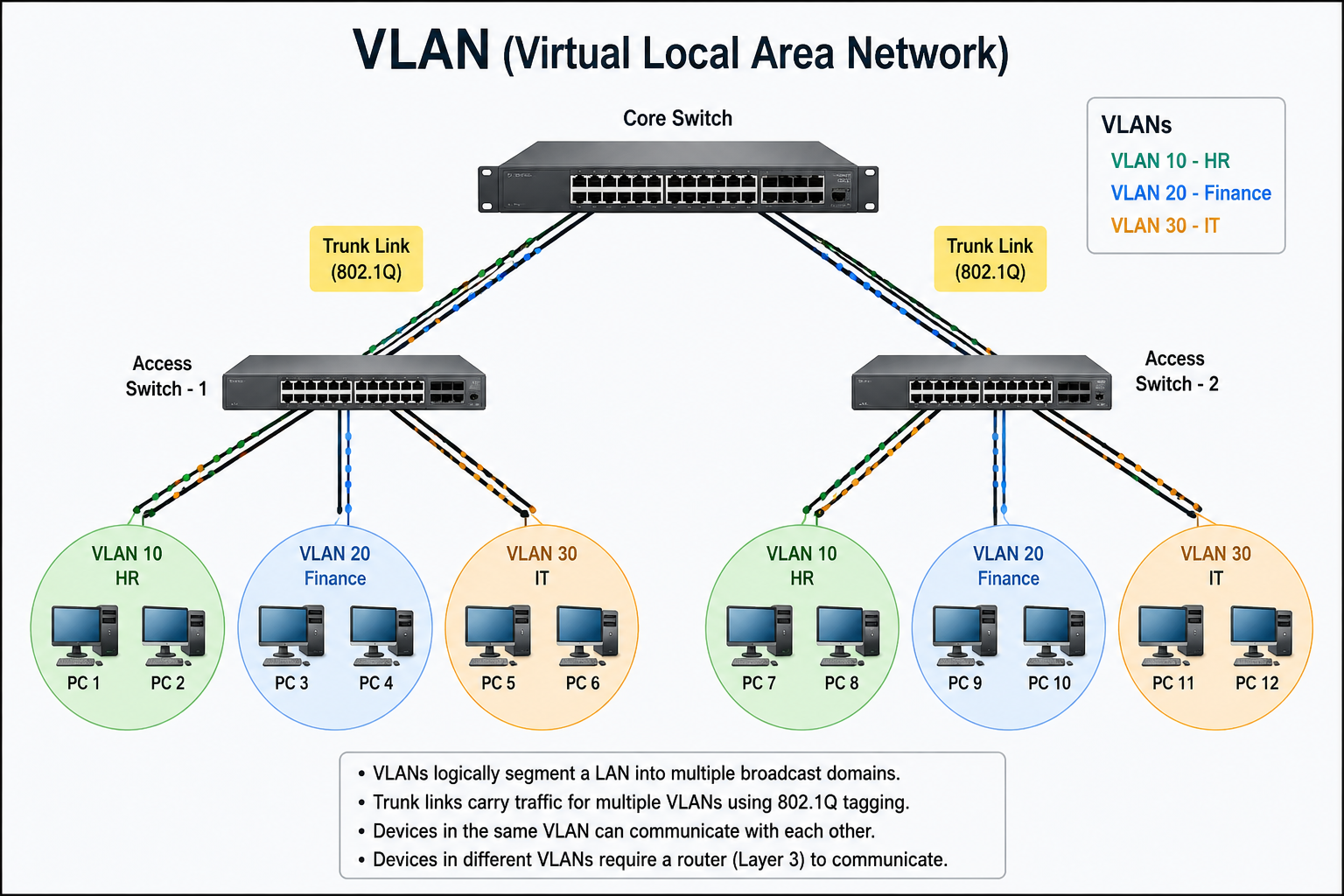
VLAN (Virtual Local Area Network) एक logical network segmentation technique है जो एक physical switch को multiple virtual networks में divide करती है। इससे अलग-अलग departments जैसे HR, Accounts और IT को same switch पर रहते हुए भी अलग network में रखा जा सकता है। VLAN Layer 2 (Data Link Layer) पर काम करता है और broadcast domain को छोटा करता है।
जब किसी switch port को किसी VLAN में assign किया जाता है, तो वह port केवल उसी VLAN के devices से communicate करता है। इससे security और performance दोनों improve होते हैं। Multiple VLANs का traffic एक ही cable से भेजने के लिए trunk port use होता है, जिसमें 802.1Q tagging VLAN ID attach करती है।
Simple language में:
VLAN एक logical network है जो physical network को multiple virtual parts में divide कर देता है।
मतलब – एक ही switch में connected devices को हम logically अलग-अलग network में divide कर सकते हैं।
Example:
मान लीजिए एक office में:
- HR Department
- Accounts Department
- IT Department
अगर सबको एक ही switch में connect कर दिया जाए, तो सभी systems एक ही broadcast domain में होंगे।
लेकिन VLAN use करके हम:
- VLAN 10 → HR
- VLAN 20 → Accounts
- VLAN 30 → IT
बना सकते हैं।
अब HR का traffic Accounts तक नहीं जाएगा जब तक routing enable न हो।
VLAN की जरूरत क्यों पड़ी?
पहले traditional LAN में:
- सभी devices same broadcast domain में होते थे
- Broadcast traffic ज्यादा होता था
- Security कम होती थी
- Performance issue आता था
VLAN solves these problems:
✅ Broadcast domain को छोटा करता है
✅ Security improve करता है
✅ Network performance better करता है
✅ Department-wise segmentation possible
✅ Logical grouping without physical changes
Broadcast Domain क्या होता है?
Broadcast domain मतलब:
वो area जहाँ एक broadcast message सभी devices तक पहुँचता है।
अगर एक network में 200 devices हैं और कोई ARP request broadcast होता है, तो सभी 200 devices receive करेंगे।
VLAN इस problem को solve करता है by dividing broadcast domain.
VLAN कैसे काम करता है?
Switch layer 2 device है। VLAN concept भी Layer 2 पर काम करता है।
जब हम switch में VLAN create करते हैं:
- VLAN ID assign करते हैं (जैसे 10, 20, 30)
- Ports को specific VLAN में assign करते हैं
- Switch internally MAC address table maintain करता है per VLAN
Important Point:
VLAN बिना router के अलग-अलग VLAN आपस में communicate नहीं कर सकते।
Inter-VLAN communication के लिए:
- Router
- Layer 3 Switch
की जरूरत होती है।
VLAN Types
Default VLAN क्या है?
जब आप नया switch खरीदते हैं (Cisco या कोई भी managed switch), तो:
By default, सभी ports VLAN 1 में assign होते हैं।
मतलब अगर आपने कोई VLAN configuration नहीं किया है, तो पूरा switch VLAN 1 में काम कर रहा होगा।
Important Points
- VLAN 1 हमेशा default रहता है
- Control protocols (CDP, VTP, DTP) अक्सर VLAN 1 use करते हैं
- All ports automatically VLAN 1 में होते हैं
Example Scenario
मान लीजिए आपने switch install किया और 5 PCs connect कर दिए।
अगर आपने VLAN configure नहीं किया है, तो:
✔ सभी PCs एक ही broadcast domain में होंगे
✔ सभी VLAN 1 में होंगे
✔ कोई segmentation नहीं होगा
Security Risk
Best practice क्या कहती है?
Production network में VLAN 1 use नहीं करना चाहिए।
क्यों?
- यह default है
- Attackers को पता होता है
- कई control traffic VLAN 1 में चलता है
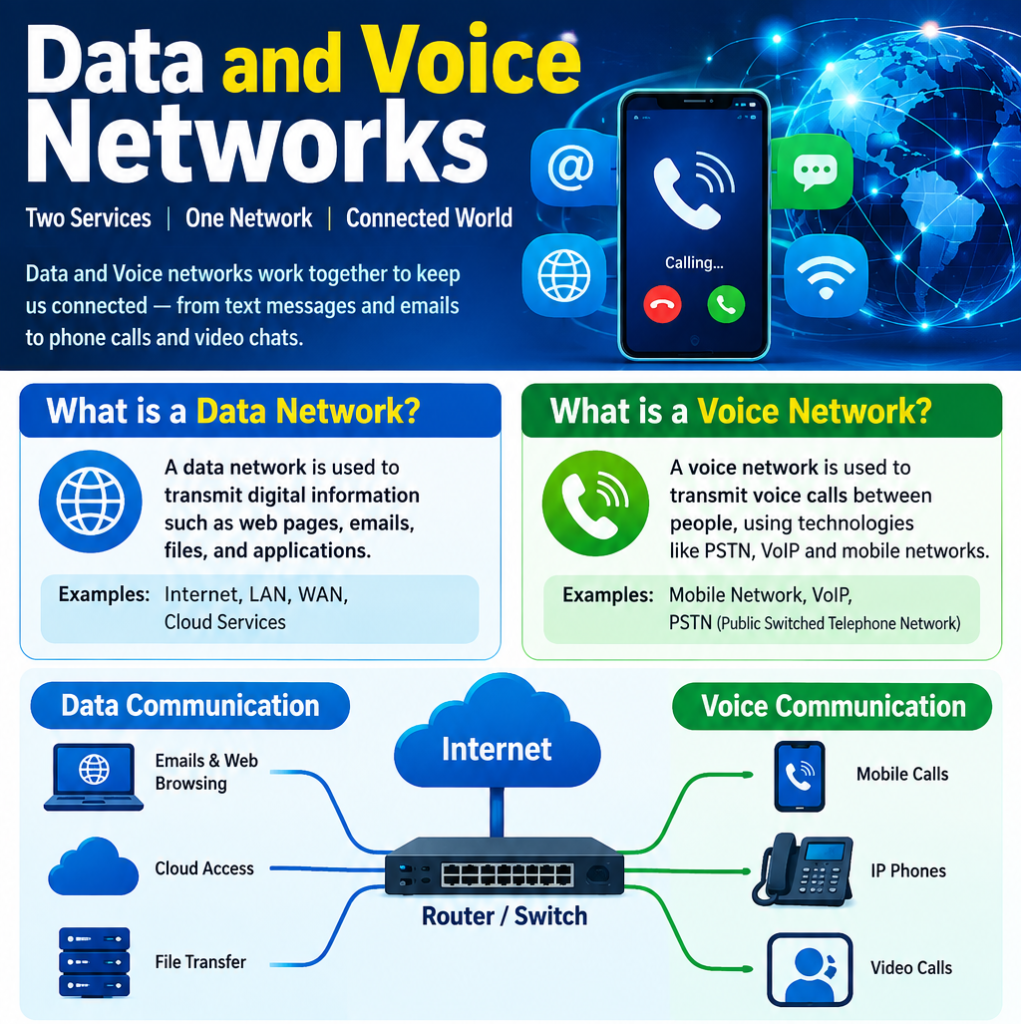
Data VLAN क्या है?
Data VLAN वह VLAN है जो user data traffic carry करता है।
मतलब:
- PC
- Laptop
- Printer
- Desktop systems
इन सबका traffic Data VLAN में जाता है।
Example
Company में:
- VLAN 10 → HR Department
- VLAN 20 → Accounts
- VLAN 30 → IT
यह सब Data VLAN के examples हैं।
Practical Example
अगर HR department के PCs VLAN 10 में हैं:
- HR का broadcast सिर्फ HR तक रहेगा
- Accounts तक नहीं जाएगा
- Performance improve होगी
- Security better होगी
Key Point
Data VLAN = End user devices वाला VLAN
Voice VLAN क्या है?
Voice VLAN specially IP Phones के लिए design किया जाता है।
आजकल offices में VoIP phones use होते हैं।
Voice traffic को separate रखना जरूरी होता है।
Voice VLAN की जरूरत क्यों?
Voice traffic:
- Delay sensitive होता है
- Low latency चाहिए
- Packet loss नहीं होना चाहिए
- QoS (Quality of Service) जरूरी है
अगर voice और data same VLAN में होंगे, तो:
❌ Call break हो सकता है
❌ Voice quality खराब होगी
❌ Delay आएगा
Voice VLAN कैसे काम करता है?
Interesting part:
एक ही switch port पर:
- PC भी connect हो सकता है
- IP Phone भी connect हो सकता है
Configuration example (Cisco):
Switch(config-if)# switchport voice vlan 20
इसमें:
- Data VLAN अलग
- Voice VLAN अलग
Phone automatically tagged traffic भेजता है।
Voice VLAN Advantages
✔ Better voice quality
✔ Separate broadcast domain
✔ QoS enable
✔ Professional network design
Management VLAN क्या है?
Management VLAN वह VLAN है जो network devices manage करने के लिए use होती है।
मतलब:
- Switch
- Router
- Firewall
- Access Point
इनको remote access करने के लिए management VLAN use करते हैं।
Example
Switch को manage करने के लिए IP assign करते हैं:
interface vlan 99
ip address 192.168.99.2 255.255.255.0
अगर VLAN 99 management VLAN है:
- Admin उसी VLAN से switch access करेगा
- SSH/Telnet उसी VLAN से होगा
- Monitoring traffic अलग रहेगा
Security Benefit
अगर management VLAN अलग नहीं होगा:
❌ कोई भी user switch access करने की कोशिश कर सकता है
❌ Security risk बढ़ेगा
Best practice:
Management VLAN को separate और restricted रखना चाहिए।
Native VLAN क्या है?
अब आते हैं सबसे confusing VLAN पर — Native VLAN।
जब trunk port configured होता है और multiple VLAN traffic carry करता है, तो:
एक VLAN untagged रहता है – वही Native VLAN होता है।
By default:
Native VLAN = VLAN 1
VLAN Trunk Port क्या है?
Trunk port एक special switch port होता है जो multiple VLANs का traffic एक ही link से carry करता है। Normally access port सिर्फ एक VLAN का traffic भेजता है, लेकिन trunk port कई VLANs को allow करता है।
जब दो switches आपस में connect होते हैं, तो उनके बीच data transfer करने के लिए trunk port use किया जाता है। Router और switch के बीच भी trunk link बनाया जा सकता है (Router on a Stick concept)।
Trunk port VLAN traffic को पहचानने के लिए 802.1Q tagging use करता है। इस tagging में frame के अंदर VLAN ID add होती है, जिससे receiving switch समझ जाता है कि यह traffic किस VLAN का है।
By default, trunk port की native VLAN untagged रहती है (usually VLAN 1)।
Simple words में:
👉 Trunk port = One cable, multiple VLAN communication.
यह enterprise networks में बहुत important concept है।
अब मान लीजिए आपके पास 2 switches हैं और दोनों में VLAN 10, 20, 30 configured हैं।
अगर आप दोनों switches को connect करेंगे, तो multiple VLAN traffic एक ही cable से जाएगा।
इस situation में हम use करते हैं:
🔥 VLAN Trunk Port
Trunk Port क्या करता है?
✔ Multiple VLANs का traffic carry करता है
✔ Switch to Switch connection में use होता है
✔ Router to Switch connection में use होता है
Trunk Port Configuration (Cisco Example)
Switch(config)# interface g0/1
Switch(config-if)# switchport mode trunk
Optional:
Switch(config-if)# switchport trunk allowed vlan 10,20,30
अब g0/1 port multiple VLAN traffic carry करेगा।
802.1Q क्या है?
IEEE 802.1Q (Dot1Q) एक networking standard है जो VLAN tagging के लिए use होता है। जब multiple VLANs का traffic एक ही trunk link से गुजरता है, तो switch Ethernet frame के अंदर एक special 4-byte tag add करता है। इसी process को VLAN tagging कहते हैं।
यह tag frame में VLAN ID डालता है, जिससे receiving switch को पता चलता है कि यह frame किस VLAN से belong करता है। VLAN ID range 1 से 4094 तक होती है।
Dot1Q mainly trunk ports पर काम करता है, क्योंकि trunk port multiple VLANs का traffic carry करता है। Access port पर tagging नहीं होती।
एक important concept है Native VLAN — trunk link पर एक VLAN का traffic untagged जाता है (by default VLAN 1)। Security reasons की वजह से native VLAN change करना recommended है।
Simple शब्दों में:
👉 Dot1Q = VLAN identification system on trunk links.
👉 Without 802.1Q, multiple VLAN traffic same cable से properly separate नहीं हो सकता
802.1Q (Dot1Q)
यह एक IEEE standard है जो VLAN tagging के लिए use होता है।
Full form:
IEEE 802.1Q
जब trunk port से data जाता है, तो frame में एक tag add होता है।
इस tag में VLAN ID होती है।
802.1Q Tag Structure
Ethernet frame में 4 bytes extra add होते हैं:
- TPID (Tag Protocol Identifier)
- TCI (Tag Control Information)
- Priority
- CFI
- VLAN ID
VLAN ID range:
- 1 to 4094
VLAN Tagging क्या है?
अब आते हैं सबसे important topic पर – VLAN Tagging।
जब एक switch से दूसरे switch तक traffic जाता है और multiple VLAN traffic same cable से जाता है, तो switch को कैसे पता चले कि कौन सा frame किस VLAN का है?
Answer: VLAN Tagging.
VLAN Access vs Trunk Port (Comparison)
🔹 Access Port
- Single VLAN carry करता है
- End devices connect होते हैं
- Frames untagged होते हैं
🔹 Trunk Port
- Multiple VLAN traffic carry करता है
- Switch to Switch link
- Frames tagged होते हैं (802.1Q)
| Feature | Access Port | Trunk Port |
| VLAN Support | Single | Multiple |
| Tagging | No | Yes (802.1Q) |
| Use Case | PC | Switch/Router |
VLAN Real-Life Example
- VLAN 10 → HR
- VLAN 20 → Accounts
- VLAN 30 → IT
HR PC → Accounts PC communicate नहीं कर सकता।
अगर communication चाहिए:
Basic Cisco VLAN Configuration
VLAN Create करना:
Switch(config)# vlan 10
Switch(config-vlan)# name HR
Port Assign करना:
Switch(config)# interface fa0/1
Switch(config-if)# switchport mode access
Switch(config-if)# switchport access vlan 10
Trunk Enable करना:
Switch(config)# interface g0/1
Switch(config-if)# switchport mode trunk
VLAN Advantages
✅ Security
✅ Performance
✅ Broadcast control
✅ Logical grouping
✅ Flexible network design
VLAN Disadvantages
❌ Configuration complexity
❌ VLAN hopping attack risk
❌ Inter-VLAN routing required
VLAN Troubleshooting Commands
show vlan brief
show interfaces trunk
show mac address-table
show running-config