BSNL Router, के Features, Ports, Setup और फायदे की पूरी जानकारी
आज के समय में Internet हमारी daily life का एक जरूरी हिस्सा बन चुका है। घर हो, office हो, online classes हों या फिर video streaming और online gaming—हर जगह stable और fast internet की जरूरत होती है। BSNL Fiber Broadband users के लिए BSNL Router/ONT एक महत्वपूर्ण networking device है, जो fiber connection को internet access और Wi-Fi connectivity में बदलने का काम करता है।
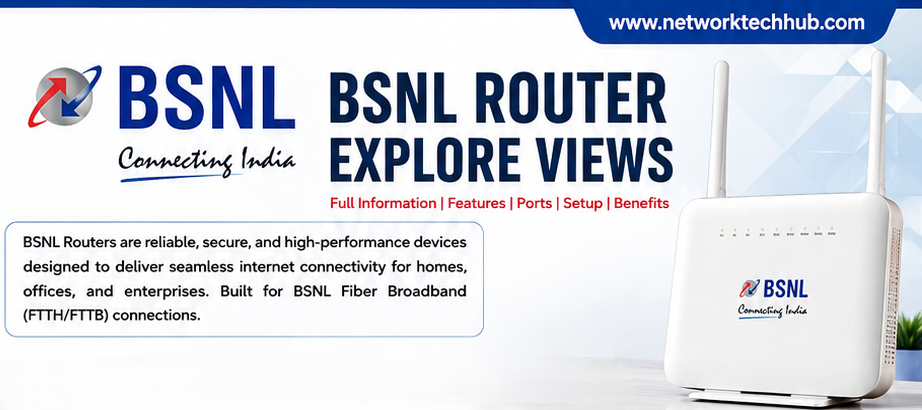
BSNL के कई fiber connections में ONT (Optical Network Terminal) और Wi-Fi Router एक ही device में मिल जाते हैं। इसलिए इसे सामान्य तौर पर BSNL Fiber Router या BSNL ONT Router भी कहा जाता है।
इस article में हम BSNL Router के working, features, ports, setup process, security और performance tips को आसान भाषा में समझेंगे।
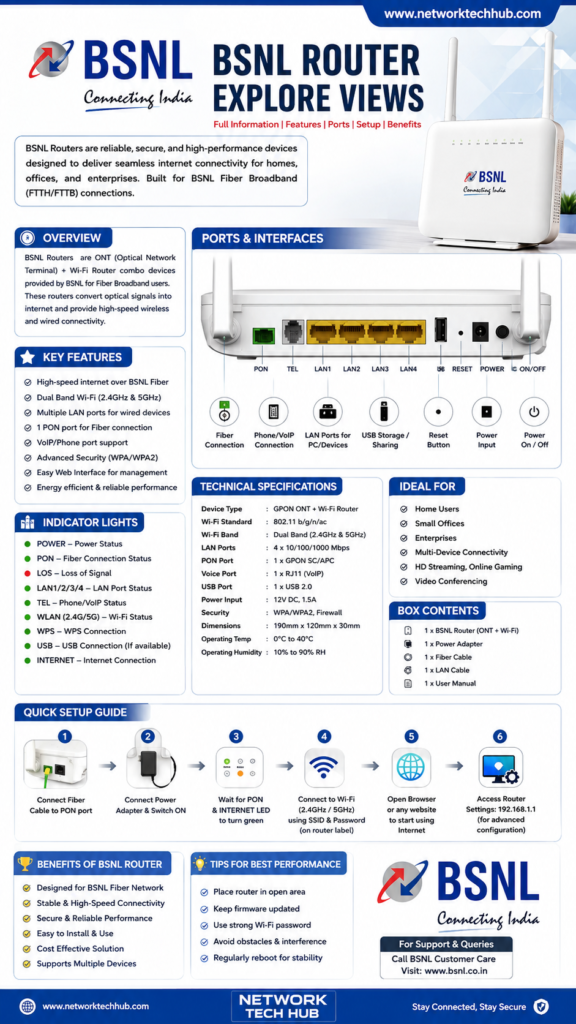
BSNL Router क्या होता है?
BSNL Router एक networking device है जो BSNL Fiber Broadband connection को आपके घर या office के अलग-अलग devices तक पहुंचाता है। Fiber cable से आने वाला optical signal पहले ONT section द्वारा process किया जाता है और उसके बाद router internet connection को Wi-Fi तथा LAN ports के माध्यम से computers, smartphones, Smart TV, printers और अन्य devices तक पहुंचाता है।
आसान भाषा में:
BSNL Fiber → ONT/Router → Wi-Fi/LAN → Your Devices
अगर आपके पास BSNL FTTH connection है, तो router आपके पूरे network का central device बन जाता है।
🔹 Key Features
• Dual-band Wi-Fi (2.4GHz + 5GHz)
• Gigabit LAN connectivity
• Fiber/GPON connection
• VoIP/Phone support
• USB connectivity on supported models
• WPA/WPA2 security
• Multiple-device connectivity
BSNL Router कैसे काम करता है?
BSNL Fiber network में internet signal optical fiber cable के माध्यम से आपके location तक आता है। यह cable router/ONT के PON port में connect होती है।
Router इस connection को process करने के बाद internet connectivity उपलब्ध कराता है। इसके बाद आप Wi-Fi के जरिए smartphone और laptop connect कर सकते हैं, जबकि LAN cable के जरिए desktop computer, Smart TV, network printer या दूसरे wired devices को connect किया जा सकता है।
इस process को समझना बहुत आसान है:
Fiber Cable → PON Port → ONT → Router → Wi-Fi/LAN → Internet Devices
BSNL Router के प्रमुख Features
BSNL Fiber routers में model के अनुसार अलग-अलग specifications हो सकती हैं, लेकिन सामान्य तौर पर इनमें कई useful features मिलते हैं।
1. Dual-Band Wi-Fi
कई modern BSNL-compatible routers में 2.4GHz और 5GHz Wi-Fi support मिलता है।
2.4GHz network ज्यादा range देने के लिए उपयोगी होता है, जबकि 5GHz band आमतौर पर कम interference और बेहतर speed के लिए उपयोग किया जाता है, खासकर router के पास मौजूद compatible devices में।
2. Fiber Connectivity
BSNL FTTH connection के लिए router/ONT में optical fiber connection के लिए PON interface दिया जाता है। इसी interface के माध्यम से fiber network router तक पहुंचता है।
3. LAN Ports
Router में LAN ports के माध्यम से wired devices connect किए जा सकते हैं। उदाहरण के लिए:
- Desktop Computer
- Laptop
- Smart TV
- Network Printer
- CCTV/NVR
- Other Networking Devices
LAN port की actual speed router के model पर depend करती है।
4. Wi-Fi Connectivity
एक router से कई smartphones, laptops, tablets और Smart TVs connect किए जा सकते हैं। हालांकि कितने devices एक साथ अच्छी performance देंगे, यह router hardware, internet plan, Wi-Fi environment और network usage पर निर्भर करता है।
5. Security
Modern routers में Wi-Fi security के लिए password protection और encryption options उपलब्ध होते हैं। Strong Wi-Fi password रखना network security के लिए बहुत जरूरी है।
BSNL Router के Ports और उनका काम
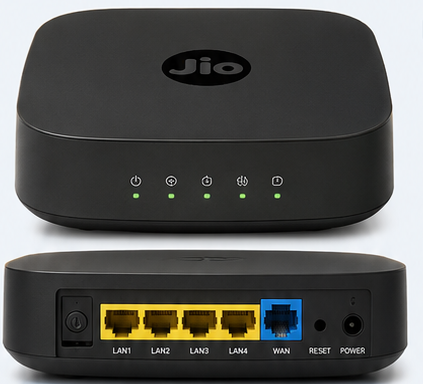
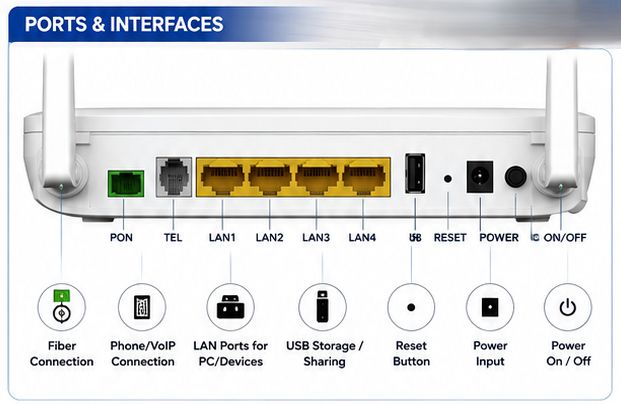
Router के पीछे कई ports और buttons दिखाई देते हैं। हर port का अपना अलग काम होता है।
PON Port
यह optical fiber connection के लिए इस्तेमाल किया जाता है। BSNL FTTH connection की fiber cable इसी interface से जुड़ती है।
LAN Ports
LAN ports wired networking के लिए होते हैं। Computer, Smart TV या दूसरे Ethernet-supported devices को network cable से connect किया जा सकता है।
TEL/Phone Port
कुछ BSNL ONT models में telephone या VoIP service के लिए TEL port दिया जाता है। इसकी availability और functionality आपके connection और device model पर depend करती है।
USB Port
कुछ router models में USB port भी होता है। इसका उपयोग model-specific features जैसे USB storage या अन्य supported functions के लिए किया जा सकता है।
Reset Button
अगर router की settings में समस्या हो या factory reset की जरूरत हो, तो reset button इस्तेमाल किया जा सकता है। ध्यान रखें कि factory reset करने से customized settings हट सकती हैं।
Power Port
Power adapter router को electrical power provide करता है।
BSNL Router को कैसे Setup करें?
BSNL Fiber Router की basic installation आमतौर पर आसान होती है।
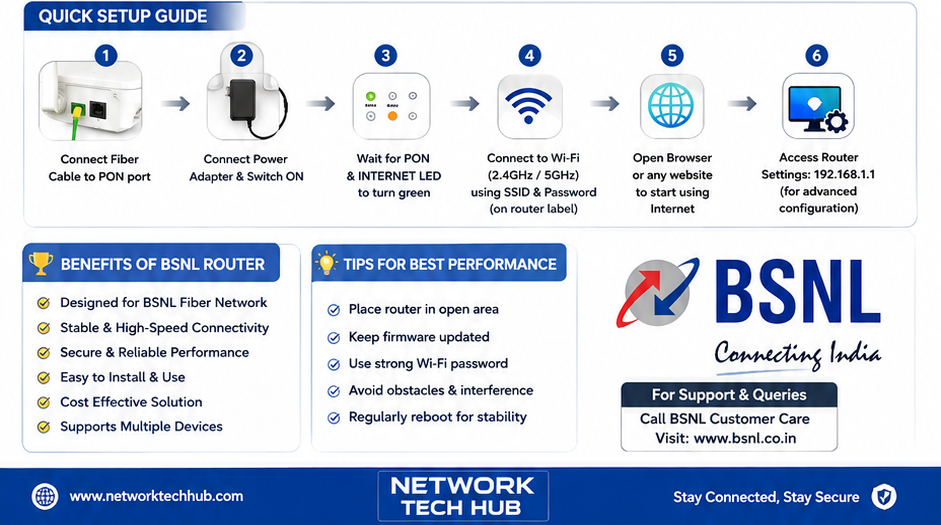
Step 1: Fiber Cable Connect करें
Fiber cable को router/ONT के PON या optical port में properly connect करें।
Step 2: Power Adapter लगाएं
Power adapter connect करके router को ON करें।
Step 3: Indicator Lights Check करें
Router के PON, LOS, Internet और Wi-Fi indicators को check करें। LEDs का exact meaning model के अनुसार अलग हो सकता है।
Step 4: Wi-Fi से Connect करें
Router के label पर दिए गए default SSID और password की मदद से smartphone या laptop को Wi-Fi से connect करें।
Step 5: Router Settings Open करें
अगर configuration की जरूरत है तो router के model के अनुसार management address/browser interface का इस्तेमाल करें।
Step 6: Wi-Fi Password बदलें
Default password की जगह एक मजबूत और unique password रखना बेहतर है।
BSNL Router की Performance कैसे बेहतर करें?
कई बार internet speed अच्छी होने के बावजूद Wi-Fi performance खराब महसूस होती है। इसका कारण हमेशा ISP या router नहीं होता; Wi-Fi interference और router placement भी महत्वपूर्ण भूमिका निभाते हैं।
Router को ऐसी जगह रखें जहां आसपास बहुत ज्यादा walls या metal objects न हों। Router को बंद cabinet के अंदर रखने से भी wireless coverage प्रभावित हो सकती है।
इसके अलावा:
- Strong Wi-Fi password रखें।
- Router को खुले और उचित स्थान पर रखें।
- जरूरत के अनुसार 2.4GHz या 5GHz band इस्तेमाल करें।
- Router firmware को उपलब्ध होने पर update करें।
- अनजान devices को Wi-Fi से remove करें।
- बहुत ज्यादा interference वाले स्थान से router को दूर रखें।
- जरूरत पड़ने पर wired LAN connection इस्तेमाल करें।
BSNL Router के फायदे
BSNL Fiber Router का सबसे बड़ा फायदा यह है कि यह fiber internet connection को घर या office के कई devices तक आसानी से distribute कर सकता है।
इसके प्रमुख फायदे हैं:
Fast Connectivity: Fiber broadband के साथ high-speed internet experience मिल सकता है।
Wireless Access: Smartphone, laptop और Smart TV जैसे devices Wi-Fi से connect हो सकते हैं।
Wired Connection: LAN ports stable wired connectivity के लिए उपयोगी हैं।
Multiple Devices: एक ही network पर कई devices connect किए जा सकते हैं।
Easy Management: Router interface के माध्यम से Wi-Fi और network settings manage की जा सकती हैं।
🔹 Ports & Interfaces
PON/Fiber • TEL/VoIP • LAN 1–4 • USB • Reset • Power • Wi-Fi
🔹 Ideal For
🏠 Homes | 🏢 Offices | 🏫 Small Businesses | 🎥 Streaming | 🎮 Online Gaming | 💻 Multiple Devices
🔹 Quick Setup
Connect Fiber → Connect Power → Wait for PON/Internet LED → Connect Wi-Fi → Open Browser → Configure Router.
💡 Performance Tips
Keep firmware updated, use a strong Wi-Fi password, place the router in an open area and avoid signal interference.
BSNL Router में Internet Slow क्यों हो सकता है?
अगर BSNL Fiber connection होने के बावजूद internet slow लग रहा है, तो कई factors responsible हो सकते हैं।
सबसे पहले यह check करें कि समस्या सभी devices में है या सिर्फ एक device में। इसके बाद Wi-Fi signal strength, router placement, connected devices और network usage check करें।
अगर LAN connection पर speed ठीक है लेकिन Wi-Fi पर कम है, तो समस्या wireless environment या Wi-Fi configuration से संबंधित हो सकती है।
वहीं अगर wired और wireless दोनों पर समस्या है, तो fiber connection, router/ONT या ISP-side issue की जांच की जरूरत हो सकती है।
BSNL Router और Normal Wi-Fi Router में अंतर
एक सामान्य Wi-Fi router आमतौर पर Ethernet/WAN connection को अलग-अलग devices तक distribute करता है। जबकि BSNL FTTH setup में ONT का काम optical fiber signal को network connectivity में convert करना भी होता है।
कुछ BSNL devices में ONT और Wi-Fi router दोनों functions एक ही hardware में integrated होते हैं। इसलिए FTTH connection में इस्तेमाल होने वाला device केवल traditional Wi-Fi router से थोड़ा अलग हो सकता है।
Final Conclusion BSNL Router
BSNL Router/ONT BSNL Fiber Broadband network का एक महत्वपूर्ण हिस्सा है। यह fiber connection को Wi-Fi और wired network में distribute करके smartphones, computers, Smart TVs और दूसरे devices को internet से connect करने में मदद करता है।
अगर आप BSNL Fiber connection इस्तेमाल करते हैं, तो router की basic settings, ports, indicator lights और Wi-Fi security को समझना काफी उपयोगी है। सही placement, मजबूत password और उचित network configuration से आप अपने home या office network को ज्यादा stable और secure बना सकते हैं।
ध्यान रखें कि BSNL Router के features, ports, Wi-Fi standards और specifications model के अनुसार अलग हो सकते हैं, इसलिए किसी specific router की exact technical specification के लिए उसके model number और official documentation को जरूर देखें।
Network & Technology Information
Networking, Routers, Switches, CCNA, CCTV, Computer Hardware और Technology से जुड़ी आसान और practical जानकारी के लिए:
Network Tech Hub — Learn Networking, Understand Technology, Build Better Networks.