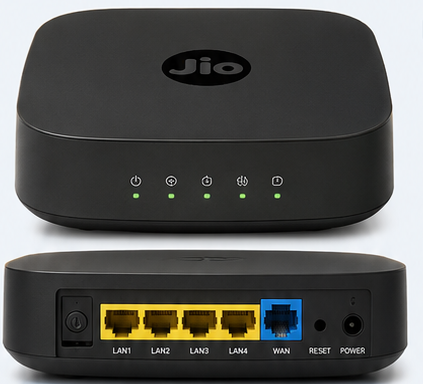
Jio Router Complete Internal Design, Components, Working & Features
आज के समय में Internet और Wi-Fi हमारी daily life का एक important हिस्सा बन चुके हैं। घर हो, office हो या small business, एक अच्छा router multiple devices को internet से connect करने का काम करता है। बाहर से देखने पर Jio Router एक compact और simple networking device दिखाई देता है, लेकिन इसके अंदर कई electronic और networking components होते हैं जो मिलकर high-speed internet connectivity provide करते हैं।
इस article में हम Jio Router Exploded View को detail में समझेंगे। इसमें router के external design के साथ-साथ Main PCB, Processor, Wi-Fi Chipset, Internal Antennas, Heat Sink, LED Board, LAN Ports, WAN Port, Power Section और अन्य internal components के बारे में जानकारी दी गई है।
यह information Networking Students, CCNA Learners, IT Professionals, Network Engineers और Technology Enthusiasts के लिए useful हो सकती है।
Jio Router क्या है?
Jio Router एक networking device है, जिसका काम internet connection को घर या office में मौजूद अलग-अलग devices तक distribute करना है।
जब Jio Fiber या किसी compatible internet connection से connectivity router तक आती है, तो router उस connection को Wi-Fi और Ethernet/LAN के माध्यम से अलग-अलग devices तक पहुंचाता है।
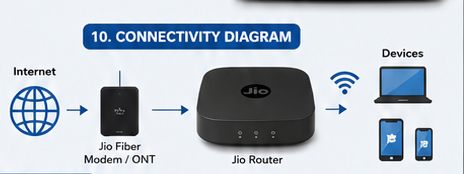
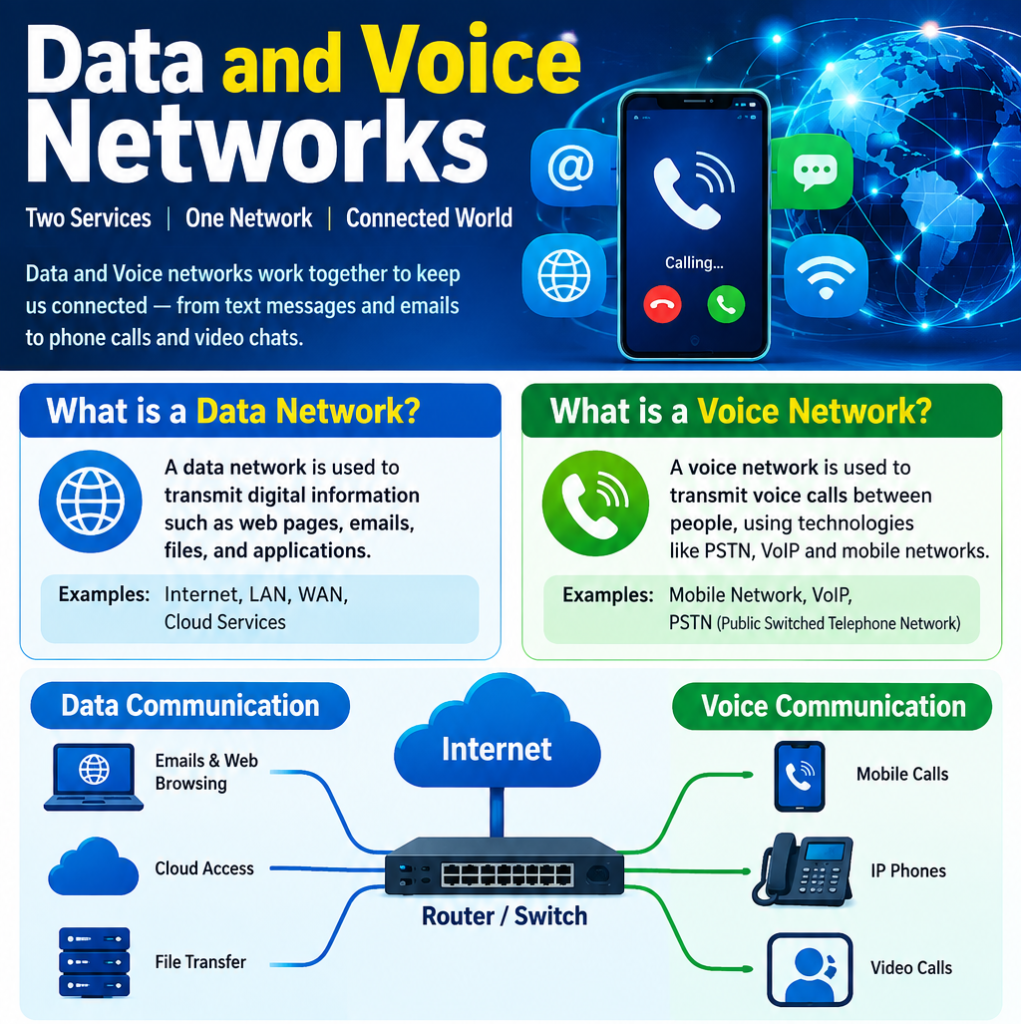
Simple networking flow इस तरह समझ सकते हैं:
Internet → Jio Fiber / ONT → Jio Router → Wi-Fi / LAN → Connected Devices
Connected devices में smartphone, laptop, desktop computer, Smart TV, gaming console, printer और दूसरे smart devices शामिल हो सकते हैं।
Jio Router Exploded View क्या होता है?
Exploded View एक technical illustration होती है जिसमें किसी electronic device को उसके अलग-अलग components के साथ अलग करके दिखाया जाता है।
Jio Router के exploded view में हम router की outer body के अंदर मौजूद important parts को visually समझ सकते हैं।
एक typical router exploded design में ये components दिखाई दे सकते हैं:
- Top Cover
- LED Indicator Board
- Main PCB
- Processor / Networking Chipset
- Wi-Fi Chipset
- Heat Sink
- Internal Antennas
- Ethernet Ports
- Power Section
- Bottom Case / Plastic Housing
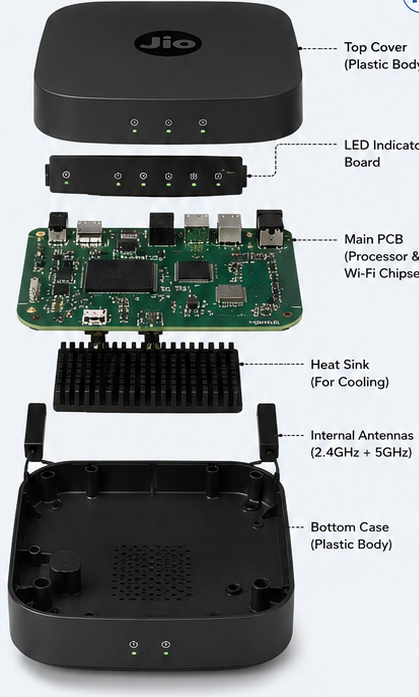
ध्यान रखें कि exact internal components और specifications अलग-अलग Jio Router models में अलग हो सकते हैं।
1. Top Plastic Cover
Router का सबसे ऊपर वाला हिस्सा Top Cover होता है।
यह generally plastic से बना enclosure होता है जो अंदर मौजूद electronic components को protect करता है।
Top cover के मुख्य काम हैं:
- Internal hardware को physical protection देना
- Dust और accidental contact से components को बचाना
- Router के components को proper position में रखना
- Device को compact और professional appearance देना
Router के top पर अक्सर Jio branding दिखाई देती है, जबकि front side पर status LEDs होती हैं।
2. LED Indicator Board
Router के front side पर जो small lights दिखाई देती हैं, उनके पीछे LED Indicator Board या indicator circuitry काम करती है।
ये LEDs router की current status information provide करती हैं।
उदाहरण के लिए indicators से पता चल सकता है:
- Power ON है या नहीं
- Internet connection available है या नहीं
- Wi-Fi active है या नहीं
- LAN connection active है या नहीं
- WPS या pairing activity क्या है
Networking troubleshooting में LEDs काफी useful होती हैं।
अगर router में internet नहीं आ रहा है, तो सबसे पहले technician अक्सर Power, Internet/WAN और Wi-Fi indicators check करता है।
3. Main PCB — Router का Main Circuit Board
PCB यानी Printed Circuit Board router का सबसे important hardware section होता है।
Router के लगभग सभी major electronic components PCB के साथ connected होते हैं।
PCB पर कई तरह के electronic components और integrated circuits लगे होते हैं, जो router के processing और communication functions को operate करते हैं।
Main PCB के ऊपर या उसके आसपास आपको अलग-अलग chips, connectors, power circuitry और communication components देखने को मिल सकते हैं।
Simple language में कहें तो:
Main PCB = Router का electronic platform
4. Processor / Networking Chipset
Router के अंदर मौजूद Processor या Networking SoC/Chipset को router का brain कहा जा सकता है।
यह incoming और outgoing network data को process करता है और decide करता है कि network packets को किस direction में forward करना है।
Processor networking के कई functions को handle कर सकता है, जैसे:
- Packet Processing
- Routing
- DHCP
- NAT
- Firewall Functions
- Network Management
- Device Communication
- Wireless Coordination
जब कोई smartphone internet पर कोई website open करता है, तो उसके data packets router के through process होते हैं।
यानी user को सिर्फ Wi-Fi connection दिखाई देता है, लेकिन अंदर काफी तेजी से packet processing हो रही होती है।
5. Wi-Fi Chipset
Wi-Fi chipset wireless communication का major component है।
यह router को smartphones, laptops, tablets, Smart TVs और दूसरे wireless devices के साथ communication करने में मदद करता है।
Dual-band Wi-Fi router में generally:
2.4 GHz + 5 GHz
जैसे wireless bands का support हो सकता है।
2.4 GHz
2.4 GHz frequency generally longer range provide करती है और walls को comparatively बेहतर penetrate कर सकती है।
5 GHz
5 GHz band generally higher wireless performance provide कर सकता है, लेकिन इसकी effective range environment और obstacles के कारण कम हो सकती है।
Actual performance router model, channel conditions, interference, client device और environment पर depend करती है।
6. Internal Antennas
Router के अंदर Internal Antennas wireless signals को transmit और receive करने का काम करती हैं।
इन antennas को router की plastic body के अंदर carefully position किया जाता है।
Wireless communication में antennas का design और placement काफी important होता है।
Router को अगर किसी closed cabinet, metal surface या बहुत ज्यादा obstruction वाले location पर रखा जाए, तो Wi-Fi performance प्रभावित हो सकती है।
इसलिए बेहतर Wi-Fi coverage के लिए router को generally open और suitable central location पर रखना अच्छा practice है।
7. Heat Sink
Router का processor और networking chipset लगातार काम करते हैं, इसलिए operation के दौरान heat generate हो सकती है।
इस heat को control करने के लिए कुछ router designs में Heat Sink लगाया जाता है।
Heat sink electronic chipset से heat transfer करने में मदद करता है।
Proper thermal management के फायदे:
- Stable operation
- Better component reliability
- Thermal stress को कम करने में मदद
- Long-term hardware performance में सहायता
Exploded view में heat sink को PCB और chipset के आसपास अलग component के रूप में देखा जा सकता है।
8. LAN Ports
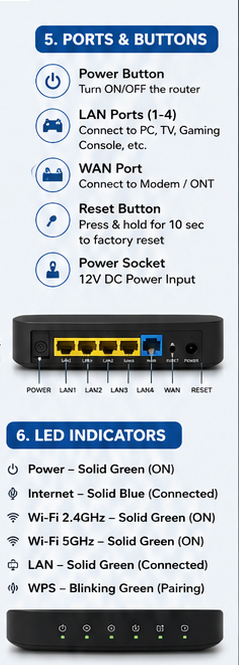
Router के पीछे दिए गए LAN Ports wired networking के लिए इस्तेमाल होते हैं।
इन ports से आप devices connect कर सकते हैं:
- Desktop PC
- Laptop
- Smart TV
- Gaming Console
- Network Switch
- Access Point
- Other Ethernet Devices
Wired Ethernet connection का सबसे बड़ा फायदा यह है कि यह generally stable और predictable connection provide करता है।
Office environment में important systems के लिए wired networking काफी useful हो सकती है।
9. WAN Port
WAN यानी Wide Area Network Port router के upstream internet connection के लिए इस्तेमाल किया जाता है।
Depending on the network design, WAN side पर router को ONT, modem या upstream networking device से connection मिल सकता है।
Simple example:
Internet → ONT → WAN → Router → LAN/Wi-Fi Devices
यही basic structure कई home और small-office networks में दिखाई देता है।
10. Power Section
Router को operate करने के लिए DC power की जरूरत होती है।
External power adapter से मिलने वाली electricity router के internal power circuitry तक पहुंचती है, जहां से अलग-अलग electronic components को required power provide की जाती है।
इसलिए हमेशा compatible power adapter का इस्तेमाल करना चाहिए।
Wrong voltage या unsuitable adapter electronic hardware को नुकसान पहुंचा सकता है।
11. Reset Button
Router के पीछे या side पर एक Reset Button दिया जा सकता है।
इसका इस्तेमाल router को factory/default configuration पर वापस लाने के लिए किया जाता है।
Reset करने के बाद पहले से configured settings हट सकती हैं, इसलिए बिना जरूरत factory reset नहीं करना चाहिए।
अगर router में configuration problem है और normal troubleshooting से issue solve नहीं हो रहा है, तभी reset procedure को carefully follow करना चाहिए।
Jio Router कैसे काम करता है?
अब पूरे router को एक simple example से समझते हैं।
मान लीजिए आपके घर में Jio Fiber internet लगा हुआ है।
सबसे पहले internet connection Fiber/ONT तक आता है।
इसके बाद network connection router तक पहुंचता है।
Router का processor और networking chipset incoming data को process करता है।
अगर आपका laptop Ethernet cable से connected है, तो data LAN port के through laptop तक जाता है।
अगर smartphone Wi-Fi से connected है, तो router का Wi-Fi chipset और internal antennas wireless communication करते हैं।
Process दोनों directions में होता है:
Internet → Router → Device
और
Device → Router → Internet
यह पूरा communication milliseconds में होता है, इसलिए user को यह process almost instant दिखाई देता है।
Jio Router में Security क्यों Important है?
Router सिर्फ internet distribute नहीं करता, बल्कि network security में भी important role निभाता है।
Modern routers में model और firmware के according कई security-related features हो सकते हैं।
Users को हमेशा:
- Strong Wi-Fi Password रखना चाहिए
- Default credentials available हों तो उन्हें change करना चाहिए
- Unknown devices को network से remove करना चाहिए
- Router firmware को updated रखना चाहिए
- Secure Wi-Fi encryption use करना चाहिए
अगर घर में multiple smart devices connected हैं, तो router security और भी important हो जाती है।
Home और Small Office में Jio Router
Jio Router home networking के लिए काफी useful हो सकता है।
एक typical home network में router से ये devices connected हो सकते हैं:
Smartphone + Laptop + Desktop + Smart TV + Printer + Gaming Console + IoT Devices
Small office में requirement बढ़ने पर router के साथ Network Switch, Access Point और अन्य networking equipment add किए जा सकते हैं।
इस तरह एक basic home network धीरे-धीरे complete small-office network में develop किया जा सकता है।
Jio Router Exploded View Students के लिए क्यों Useful है?
अगर आप CCNA, Networking या IT Hardware सीख रहे हैं, तो सिर्फ theory पढ़ना काफी नहीं है।
जब आप router को exploded view में देखते हैं, तो आपको समझ आता है कि networking hardware वास्तव में अंदर से कैसा दिखाई देता है।
Exploded view से students को इन concepts को समझने में मदद मिल सकती है:
- Router Hardware
- PCB
- Processor
- Wi-Fi Chipset
- Antenna
- Ethernet Interface
- Heat Management
- Power Circuit
- Network Connectivity
इससे theoretical networking और real-world hardware के बीच connection बनता है।
Jio Router जैसे modern networking devices के कुछ common benefits हैं:
✅ Wireless Connectivity
✅ Wired Ethernet Connectivity
✅ Multiple Device Support
✅ Dual-Band Wi-Fi Support वाले models
✅ Compact Design
✅ Easy Network Management
✅ Home और Small Office Networking के लिए useful
✅ Internet Sharing
✅ Network Security Features
Actual features और performance specific router model, firmware और network plan पर depend कर सकते हैं।
Final Conclusion
Jio Router बाहर से छोटा और simple device दिखाई देता है, लेकिन इसके अंदर कई important hardware components मिलकर networking system को operate करते हैं।
इसके Main PCB, Processor, Wi-Fi Chipset, Internal Antennas, Heat Sink, LED Indicator Board, LAN Ports, WAN Port और Power Section सभी की अपनी अलग भूमिका होती है।
जब internet connection router तक पहुंचता है, तो router उस data को process करके wired और wireless devices तक forward करता है। इसी वजह से smartphone से लेकर laptop, Smart TV और gaming console तक कई devices एक ही network connection का इस्तेमाल कर सकते हैं।
Jio Router Exploded View को समझना केवल hardware knowledge के लिए useful नहीं है, बल्कि यह networking students और beginners को यह समझने में भी मदद करता है कि Networking Theory और Real Hardware एक-दूसरे के साथ कैसे काम करते हैं।
अगर आप Networking, CCNA, CCNP, CCTV Networking, Router, Switch, Wi-Fi, Computer Hardware और IT Infrastructure से जुड़ी practical और technical जानकारी चाहते हैं, तो Network Tech Hub पर ऐसे और technical articles और diagrams पढ़ सकते हैं।
🌐 Website: www.networktechhub.com
Network Tech Hub — Learn Networking. Understand Technology. Build Your Skills.

One Comment